
HomeVisioner for Shopify
AI room visualizer for Shopify
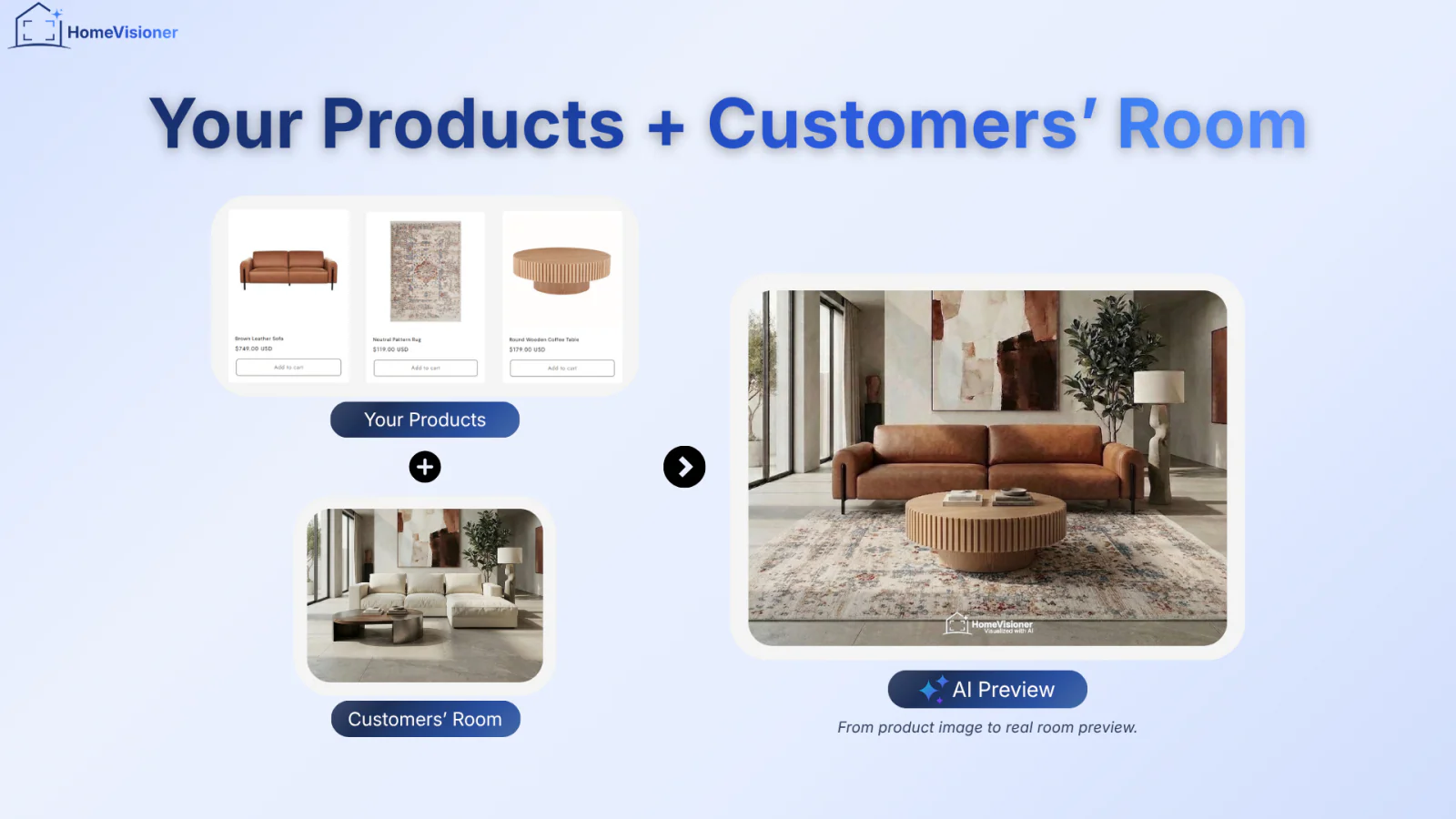
HomeVisioner adds a “See it in your room” button to your product pages. Shoppers upload a photo of their room and the AI places your product in it — a product visualizer that runs on your existing product images, with no 3D models to build.
How it works
Add the block in your Theme Editor
Install from the Shopify App Store and drag the HomeVisioner block into your product template. It takes minutes and needs no code. In Manage you pick which products or collections show the button.
Your shopper uploads a room photo
The button opens the visualizer right on the product page — no app download and no account. A short placement or size hint is optional.
The AI returns the preview
Your product is composited into their photo with matching perspective, lighting and shadow. Shoppers compare before and after, and can add the item to the cart straight from the preview.
What's in the app
Explore the features available across HomeVisioner plans.
AI room visualization on the product page
A realistic preview generated from a single uploaded room photo, usually in 20 to 30 seconds.
Works with your existing product images
The app uses the photos already attached to your Shopify products. There is nothing to model and no 3D asset to commission.
Built for home and interior catalogues
Rugs and carpets, furniture, flooring, tiles, wallpaper, lighting, wall art and home decor. Each product is visualized as an object in the room, as a floor covering, or as a wall finish.
Before/after comparison
A slider over the shopper's own photo makes the change easy to read. Results can be downloaded and shared.
Customizable “See it in your room” button
Label, colour, font, shape, size, width and alignment are all set in Settings or on the block itself in the Theme Editor.
Optional add to cart from the preview
When enabled, the result view shows the product’s variants and an Add to cart button, letting shoppers continue from the preview without leaving the flow.
Widget in ten languages
English, Danish, German, Spanish, French, Italian, Dutch, Norwegian, Swedish and Turkish — in the storefront widget and in the admin app.
No-code setup
The theme app block works on Online Store 2.0 themes. No Liquid edit, no CSS, no developer — drag it wherever you want it on the product page.
Control it per product or per collection
Switch the button on for single products or a whole collection. New products in an enabled collection inherit the setting automatically.
Lead capture
Ask for an email after a set number of previews, with an optional marketing-consent checkbox. Leads collect on the Customers page and export as CSV.
Visualizations, attributed orders and revenue
Analytics reports visualizations, unique shoppers, leads, attributed orders, attributed revenue and a conversion funnel. Growth and Pro also compare product return rates and basket size before and after the first visualization using actual order history. The comparison shows a trend, not causation.
Room photos deleted after 30 days
Uploaded photos and generated previews are removed automatically. HomeVisioner answers Shopify's GDPR webhooks.
Plans
Billed by Shopify through Managed Pricing, in USD. Starter includes a 14-day free trial; Growth and Pro are charged from the day you approve them.
Free
$0 / month
- ✓20 visualizations / month
- ✓Customizable widget and lead capture
- ✓HomeVisioner watermark on results
Starter
$14.99 / month
- ✓100 visualizations / month
- ✓14-day free trial with 100 visualizations
- ✓Customer image gallery
- ✓HomeVisioner watermark on results
Growth
$49.99 / month
- ✓300 visualizations / month
- ✓Clean results — no HomeVisioner watermark
- ✓Advanced analytics and order attribution
- ✓Priority support
Pro
$149.99 / month
- ✓1,000 visualizations / month
- ✓Optional extra visualizations at $0.17 each. Set a usage limit of up to $85 per month (about 500 extras), or turn extra usage off.
- ✓Full white-label with your own logo and watermark
- ✓Priority visualization queue
Free, Starter and Growth stop at the visualizations included for the month — nothing beyond the plan price is charged on those plans.
Frequently asked questions
Ready to put it on your storefront?
Install HomeVisioner from the Shopify App Store and add the block to your product template. Start with the Free plan and upgrade whenever you need more visualizations.
Install on the Shopify App Store