
HomeVisioner for WooCommerce
AI room visualizer for WooCommerce
HomeVisioner adds a “See it in your room” button to your WooCommerce product pages. Shoppers upload a photo of their own room and see your sofa, table or rug in it — made from the product photos you already have, no 3D models needed. You manage everything in WordPress, under WooCommerce → HomeVisioner.
Free plan available · 14-day free trial on Starter
 Before
 After
How it works
- 1
Install the plugin and connect
Upload and activate “HomeVisioner: AI Room Visualizer”, then click Connect store under WooCommerce → HomeVisioner. WooCommerce asks for read-only access on its own consent screen — nothing in your store changes.
- 2
The shopper uploads a room photo
The button appears on your product pages and opens the visualizer right there — no app download, no account. On variable products it follows the variation the shopper chose.
- 3
The AI returns the preview
Your product appears in the shopper’s photo. From the result the item can go straight into the cart, and in WordPress you see which products were tried and which orders followed.
From sofas to rugs, in real rooms
Shoppers upload a photo of their own room and see the product in it — furniture, rugs and decor in the same picture.
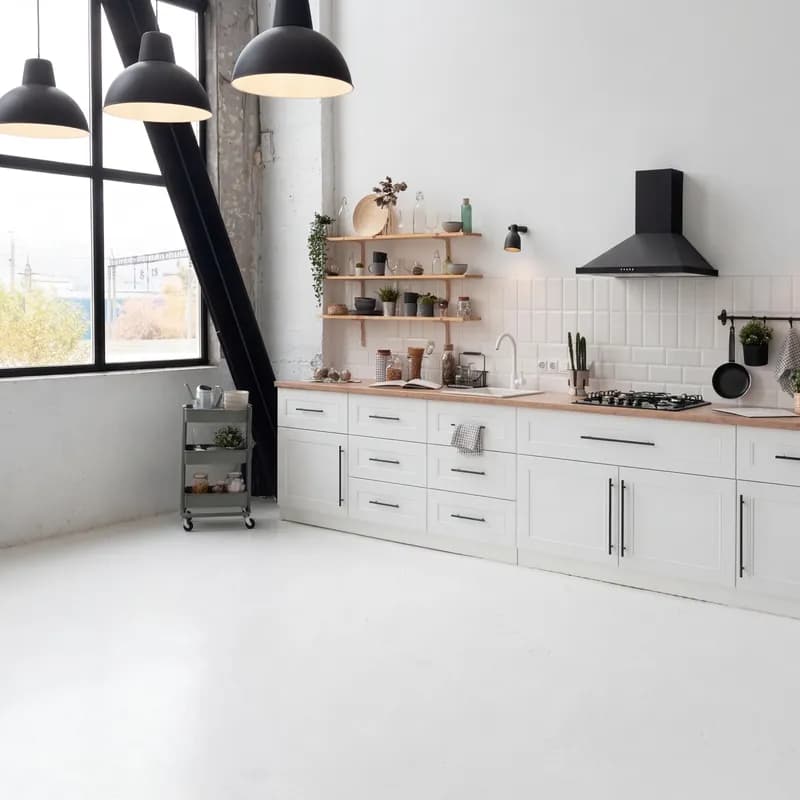 Before
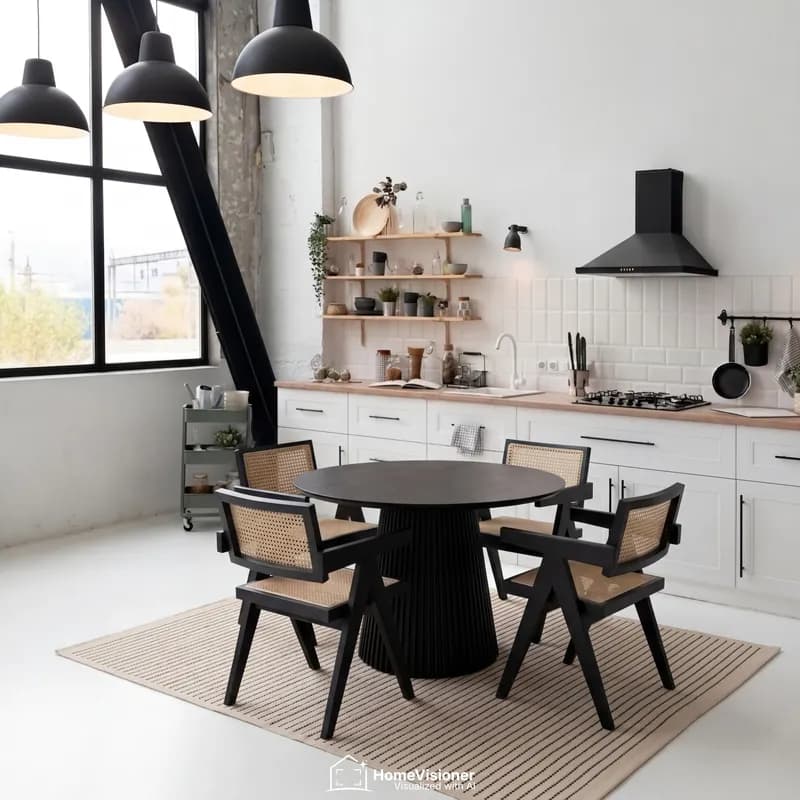 After
Dining area
Round dining table with chairs and rug
- BeforeAfter
Living room
Sofa, coffee table and rug
 Before
 After
Bedroom
Bed, armchair and rug
Sample visualizations created with HomeVisioner.
What the plugin brings
The same room visualizer as on Shopify and ikas, built into WordPress.
AI room visualization on the product page
A “See it in your room” button on your product pages; one room photo becomes a preview with your product in it.
From the product photos you already have
HomeVisioner works from the images on your WooCommerce products. There is nothing to model.
From preview to cart
The result can go straight into the cart, including variable products with the variation the shopper chose.
Managed in WordPress
Dashboard, products, customers, analytics, gallery, settings and subscription under WooCommerce → HomeVisioner. No separate HomeVisioner login.
Shopper emails
After a few free previews the widget asks for an email address, with a separate, optional checkbox for marketing emails. You see the contacts in the panel.
Attributed orders
HomeVisioner reads your orders, read-only, and shows which orders came from shoppers who used the visualizer, matched by email address.
Read-only access to your store
The connection is a read-only WooCommerce REST API key you approve in WooCommerce itself. HomeVisioner never writes to your store.
Widget in English, German and Turkish
The button and window your shoppers see come in three languages.
No theme changes
The plugin changes no theme files, products or orders. Deactivating it removes the button again.
What you need, and how to install
The plugin is small: it connects your store, puts the button on product pages and shows the HomeVisioner screens in WordPress. Everything else runs at HomeVisioner.
Requirements
- WordPress with WooCommerce 8.0 or newer
- A store served over HTTPS
- Compatible with WooCommerce’s High-Performance Order Storage (HPOS)
Installing today
- Ask us for the plugin zip; a listing in the WordPress plugin directory is to follow.
- Upload it under Plugins → Add New → Upload Plugin and activate it.
- Click Connect store under WooCommerce → HomeVisioner and approve read-only access.
What the plugin does not do
- No changes to theme files, products or orders
- No database tables of its own
- Disconnecting revokes the REST API key
Plans
The same plans as on Shopify, billed in euros by card through Stripe. Monthly plans, no yearly plans. Starter includes a 14-day free trial.
Free
Free no card needed
- 20 visualizations a month
- Customizable storefront app
- Lead capture and customer list
- Basic analytics dashboard
- HomeVisioner watermark on results
- When the quota runs out, it continues next period
Choose the plan in WordPress, under Subscription
Starter
€14.99 / month
- 100 visualizations a month
- 14-day free trial
- Everything in Free
- Customer image gallery
- HomeVisioner watermark on results
- Extra usage off by default; switch it on in Billing with a cap of up to €1,000
- Extras off by default · switch on in Billing: €0.27 per image, cap up to €1,000
Choose the plan in WordPress, under Subscription
Growth
€49.99 / month
- 300 visualizations a month
- Everything in Starter
- Clean result images without a watermark
- Advanced insights and impact analysis
- Priority support
- Extra usage capped at €50 by default; raise it up to €1,000 or switch it off
- After the quota €0.22 per image · default cap €50, raise up to €1,000 or switch off
Choose the plan in WordPress, under Subscription
Pro
€149.99 / month
- 1,000 visualizations a month
- Everything in Growth
- Full white label – upload your own logo
- Custom logo and result watermark
- Priority visualization queue
- Extra usage capped at €85 by default; raise it up to €1,000 or switch it off
- After the quota €0.17 per image · default cap €85, raise up to €1,000 or switch off
Choose the plan in WordPress, under Subscription
Every paid plan can sell extra visualizations: €0.27 (Starter), €0.22 (Growth) and €0.17 (Pro) per image. The default cap is €50 on Growth and €85 on Pro; on Starter extras are off until you switch them on. You can raise the cap up to €1,000 or turn extras off.
Request the plugin
Write to us through the contact form or at [email protected], and we send you the plugin zip with the installation steps.
Frequently asked questions
What do I need for HomeVisioner on WooCommerce?
WordPress with WooCommerce 8.0 or newer, and a store served over HTTPS. The plugin is compatible with WooCommerce’s High-Performance Order Storage (HPOS).
How do I install the plugin?
Today you get the plugin zip from us; a listing in the WordPress plugin directory is to follow. Upload it under Plugins → Add New → Upload Plugin, activate it, and click Connect store under WooCommerce → HomeVisioner.
What access does HomeVisioner get to my store?
A read-only WooCommerce REST API key, which you approve on WooCommerce’s own consent screen. HomeVisioner reads products and orders with it and cannot change anything. You can see the key under WooCommerce → Settings → Advanced → REST API.
Does the plugin change my theme?
No. It edits no theme files and adds no templates. On product pages it adds the HomeVisioner script and a small, invisible block of product data through WordPress’s standard hooks.
Do I need 3D models of my products?
No. HomeVisioner works from the product images already on your WooCommerce products.
How much does it cost?
Free includes 20 visualizations a month. Starter is €14.99 a month (100 visualizations, 14-day free trial), Growth €49.99 (300), Pro €149.99 (1,000). You pay by card through Stripe and choose the plan under Subscription in WooCommerce → HomeVisioner.
What happens when the monthly quota runs out?
On Free, visualizations continue in the next period. On Starter, extras are off by default; switched on, each further image costs €0.27. On Growth (€0.22, default cap €50) and Pro (€0.17, default cap €85) visualizations continue until the cap is reached. You set the cap anywhere from €0 to €1,000.
How do I disconnect or remove the plugin?
Click Disconnect under WooCommerce → HomeVisioner: the REST API key is revoked and the button disappears from your product pages. Deleting the plugin also removes its settings.
Ready for your WooCommerce store?
Request the plugin, connect your store and start on the free plan.